A couple of moths ago we developed a tool that would allow the conversion of DPX files to JPEG.
Contents
Location
This tool is available at X:\VetorLobo\vzConvertDPX (You could copy the shortcut to a more accesible location).
When you double click the executable you should see:

Requirements
- Files .dpx must be contained within a DPX directory (inmediate parent).
User Interface
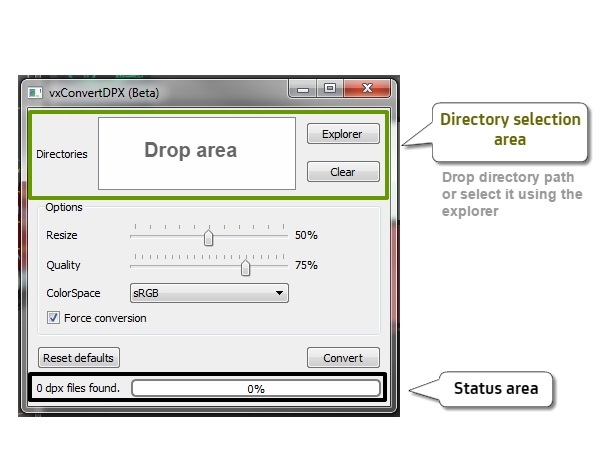
There are 3 main sections:
-
Directory entry area: Where you can select the directories that contain the .dpx files. (Note: The .dpx files must be contained in a DPX directory)
-
Options area: Where you can select the resize, quality and color space of the resulting .jpg files. You can also determine whether you want to force the recreation of .jpg files, in case they already exist. (Note: The .jpg files will be created inside a JPEG directory at the same level as the DPX directory.)
-
Status area: Where you can check the number of .dpx files found inside the selected directories, and the progress of conversion once it starts.
Usage
Let’s say we have a directory that contains .dpx files: P:\MTV-catfish_br[0236]\Discreet\SHOTS. As previously stated, the files must be contained within a DPX directory as shown below:

- We must add the paths of the directories that contain the files we want to convert to the directory entry area. Each entry will update the status area.
We can do this by dragging the directories into the drop area:

Or by using the explorer:

In this case we will select the parent directory beacuse we want to convert all files.

As you can see, the number of files found is: 330.
- Set the option values you want to apply.

In this case we will leave them as they are. To go back to default values just press Reset defaults.

- Press Convert button to start conversion.

- Once the magic is done. The tool will remain like this:

You could initiate another batch by using Clear in the directory entry area.
- The resulting files will be inside a JPEG directory at the same level as the original DPX directory.


